

Fast delivery within 72 Hours

Wago 2763-2404/211-1000
Model-Based Software Development (MBSD)Please note that this software package is chargeable!The Model Connect App serves as a mediator for the connection of ctrlX OS devices to powerful market toolcha…
Request for Quote
Shipping & Delivery
-
 Courier delivery
Our courier will deliver to the specified address
5-6 Days
From €20
-
 DHL Courier delivery
DHL courier will deliver to the specified address
2-3 Days
From €40
-
 Warranty 1 year
-
 Free 30-Day returns
Description
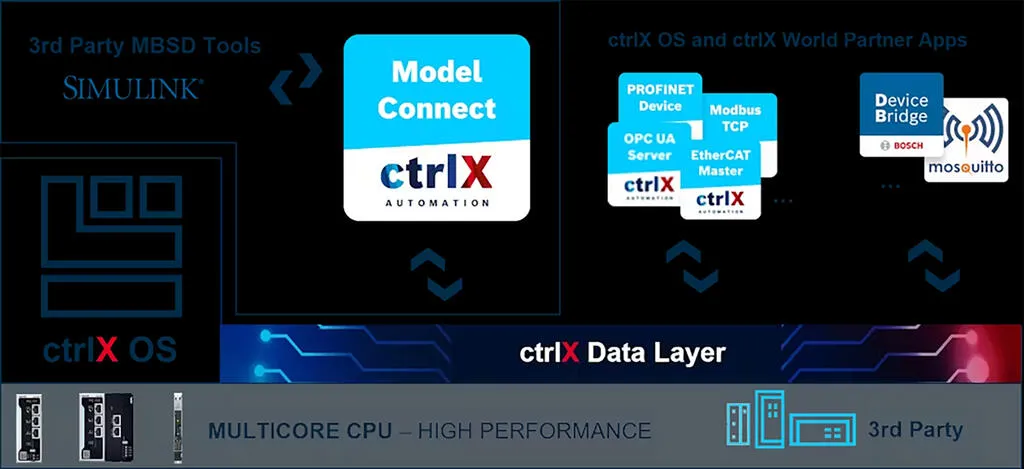
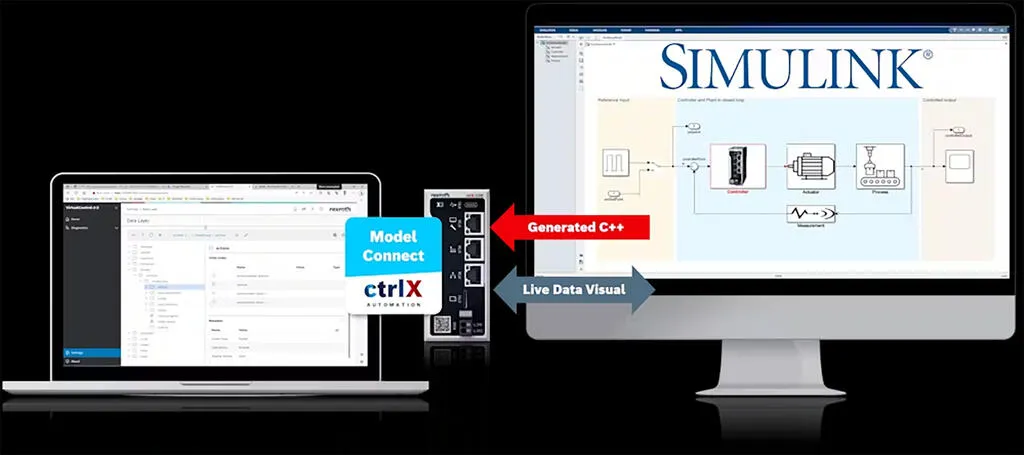
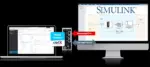
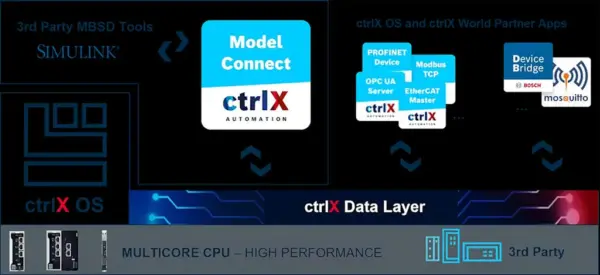
Model-Based Software Development (MBSD)Please note that this software package is chargeable!The Model Connect App serves as a mediator for the connection of ctrlX OS devices to powerful market toolchains for Model-Based Software Development (MBSD). Through the use of the ctrlX Data Layer these toolchains benefit directly from data feeds written by other ctrlX OS apps, e.g. connecting fieldbus participants. With this architecture even use cases beyond MBSD, such as simulation, virtual commissioning and live condition monitoring are approachable – all with the powers of the connected tools.A first and widely sought connection product is the integration of MathWorks Simulink® models. It is possible to integrate not only Simulink® library elements and ctrlX Data Layer variables, but also MATLAB® functions/scripts into the model. Key FeaturesA freely available MATLAB/Simulink® Support Package to model inputs and outputs from external components and ctrlX Data Layer variables. Also includes templates and samples.Comfortable, automated, and deterministic deployment of C++ from MATLAB/Simulink® to ctrlX OS devices with the press of one button (requires MATLAB Coder and Simulink or Embedded Coder).A runtime environment on the ctrlX OS device within the Model Connect App to compile, run, and manage multiple real-time models. Advanced “synchronous bundle” allows for harmonisation with scheduler.A live and real-time data connection to manipulate and visualize the ctrlX OS behavior from MATLAB/Simulink® and from the Model Connect app. Real-time execution of FMUs on a ctrlX OS deviceThe Functional Mock-up Interface (FMI) defines a standardized interface that can be used to couple different simulation software. More than 200 simulation systems on the market currently support this standard, including open source tools such as openModelica. The direct execution of FMI 2.0 co-simulation FMUs on a ctrlX OS device offers the user significantly more tool freedom for implementing their own process chains for model-based software development. Functional Mockup Units (FMU) are files that contain a simulation model that complies with the FMI standard. The Basic License delivers a lightweight scope to model control systems with a limited scope of direct input into the model: max. three new inputs and three existing Data Layer inputs per model. The executed model runs “freely” outside the scheduler scope. Model outputs are unlimited. For each controller a license is needed. The software and additional information on ctrlX can be found in our Download Center (link: https://downloadcenter.wago.com/ctrlx-os/software-ctrlx) ctrlX, ctrlX Automation and ctrlX OS are registered trademarks of Bosch Rexroth AG.MATLAB® and Simulink® are trademarks or registered trademarks of The MathWorks, Inc.
Specification
Delivery
| Delivery type | Via WAGO Download-Center (Link: https://downloadcenter.wago.com/) |
|---|---|
| License type (note) | A license is required for each controller. |
| License generation | ctrlX |
Commercial data
| PU (SPU) | 1 pcs |
|---|---|
| Packaging type | not specified |
| Country of origin | QU |
| GTIN | 4066966730784 |
| Customs tariff number | 88888888888 |
Product Classification
| ETIM 10.0 | EC001435 |
|---|---|
| ETIM 9.0 | EC001435 |
| ECCN | NO US CLASSIFICATION |
Environmental Product Compliance
| RoHS Compliance Status | Compliant,No Exemption |
|---|
Reviews
Clear filtersThere are no reviews yet.